Check Sync Progress
When you publish a new price rule or schedule a sale, the app must process updates for every eligible product in your catalog. For stores with large inventories, this is not instantaneous.
The Sync Progress feature provides real-time visibility into this background operation. It lets you track exactly how many variants have been updated and estimates when the sale will be fully live on your storefront.
View Real-Time Progress#
You can monitor the status of any active job directly from the Price Rules dashboard.
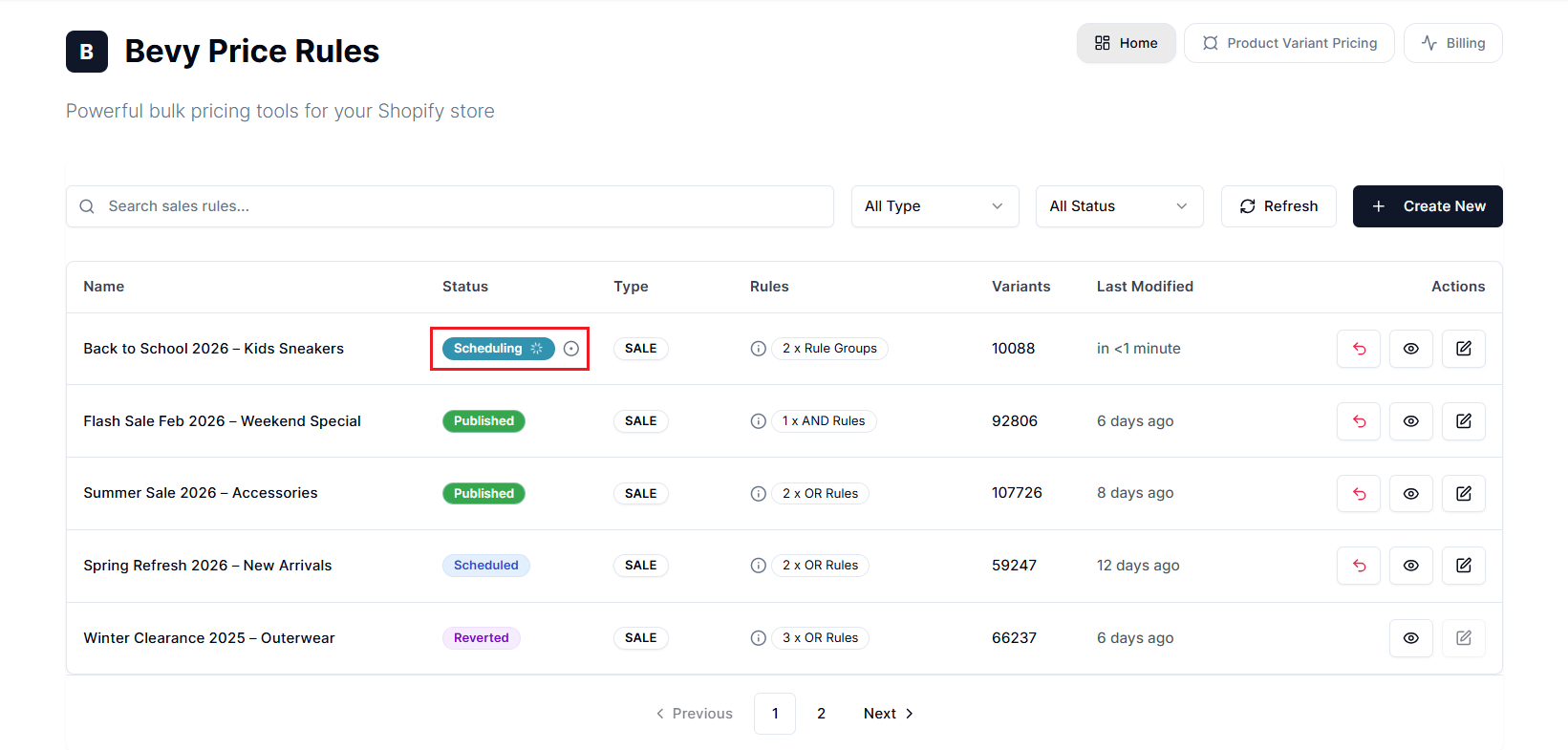
- Locate the Rule: Find the sale currently in progress. It will display a Publish Queued, Publishing, or Scheduling status badge with a loading indicator.
- Open Details: Select the status badge or the loading indicator to open the Sales Rule Sync Progress modal.
Understanding the Sync Lifecycle#
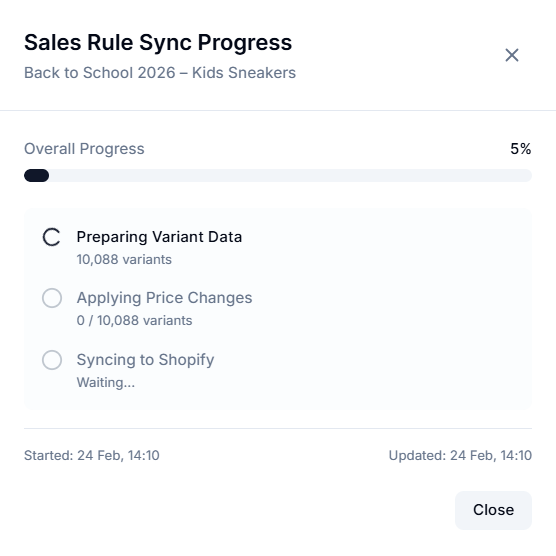
The progress modal breaks down the operation into three distinct stages. Understanding these stages helps you know exactly what the system is doing with your data.
1. Preparing Variant Data#
Indicates the system is scanning your store to identify which products match your Smart Rule filters or CSV upload.
The system counts the total number of variants (e.g., “10,325 variants”) that will be affected by this rule.
2. Applying Price Changes#
It means the app is performing calculations for each variant based on your settings (e.g., applying a 20% discount, rounding rules, and checking profit margins).
You will see a counter updating in real-time (e.g., “Applying Price Changes: 5,000 / 10,325 variants”).
3. Syncing to Shopify#
The final and most critical step. The app pushes the new Price and Compare-at-Price data to Shopify via the API.
You may notice the progress bar moving steadily as batches of products are updated on your live site.
Completion#
When the operation finishes:
- The modal displays a Sync Complete message in green.
- The dashboard status changes from:
- Publishing → Published
- Scheduling → Scheduled
- Prices on your storefront are updated.
Important Notes#
Sync Delay#
You may notice the progress bar pausing or moving at a measured pace. This is intentional.
- The Logic: Shopify imposes strict limits on how many updates an app can push per second (API Rate Limits).
- Our System: To prevent Shopify from blocking your updates or slowing down your storefront for customers, our system throttles the sync speed to stay within safe limits. This ensures your site remains fast and responsive while the sale is applying.
Closing the Window#
The sync process runs on a background server (a worker node), not in your web browser.
- Safe to Leave: You can safely close the progress modal and navigate to other pages.
- Background Processing: The sale will continue to publish in the background. When you return to the dashboard later, the status will automatically reflect the current state.
Large Catalog Expectations#
If you are running a sale on 50,000+ variants, the Syncing to Shopify stage may take a significant amount of time (15-45 minutes, depending on Shopify’s server load). We recommend scheduling large sales to start at least one hour before you send your marketing emails, so all prices are live when customers arrive.
Need help?#
If your sync progress appears stuck or is taking longer than expected, our support team can help you by taking a closer look.
Email support@bevycommerce.com, and we’ll help you confirm whether the sync is progressing normally or requires attention.