Revert Price Change
Reverting a price change restores your products to their original pricing state. The Price Rules app lets you automatically revert prices according to a schedule or manually from the dashboard if you need to end a sale immediately.
How Does Reversion Work?#
When a sale is reverted, the app performs three specific actions:
- Restores Prices: It retrieves the original price and Compare-at-Price values from the price change logs that were recorded when the sale was activated.
- Removes Tags: If you enabled the Sync tags to Shopify option, the app removes tags from products.
- Updates Status: The rule status changes from Published to Reverting, then to Reverted once the background job completes.
Reversion Types#
Auto Reversion#
The most efficient way to handle price restoration is to set an End Date when creating a rule.
- Setup: During rule creation or editing, enable the schedule and set an End Date & Time.
- Execution: The system schedules a background task to end the sale. At the specified time, the app automatically reverts the prices without requiring manual intervention.
Manual Reversion#
If you need to end a sale early, for example, if inventory runs low or a pricing error is discovered, you can manually trigger a revert.
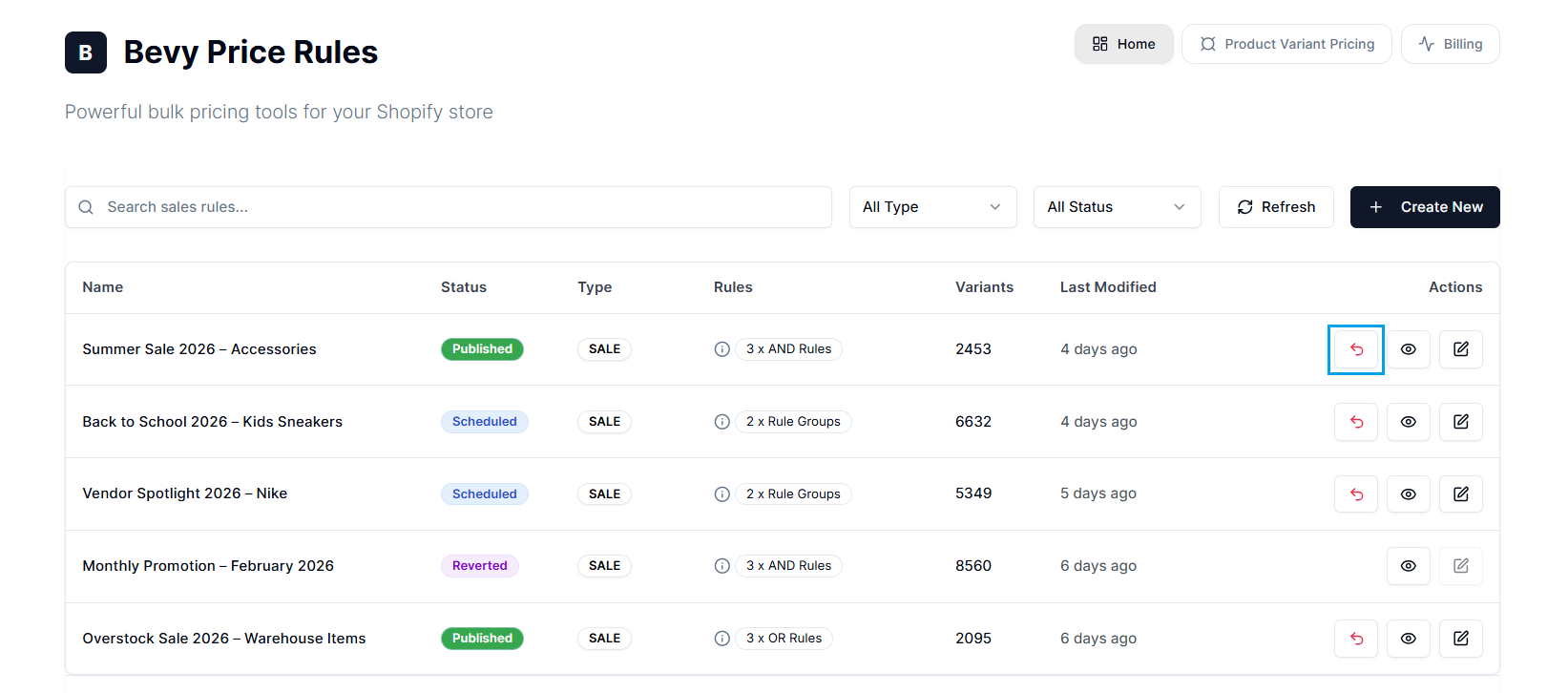
Step 1: Navigate to the Price Rules Home or dashboard. Step 2: Locate the active rule (marked with a green Published status) in the table. Step 3: In the Actions column, select the Revert icon (the curved back arrow).
Step 4: The app displays a confirmation modal. Select Revert to confirm.
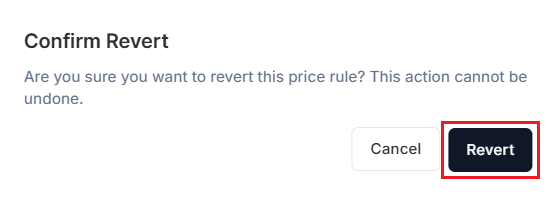
After this, you’ll see a confirmation message, “Revert initiated successfully,” as background workers begin processing the updates. Also, the dashboard updates the rule status to Reverting, then to Reverted once the revert is complete.
Note: Once a rule is marked as Reverted, it is permanently closed. The app archives it for your records, and you can’t edit or reactivate a reverted rule.
Good to Know#
1. The Revert Logic#
From a merchant’s perspective, understanding the logic behind reversion is critical to preventing data conflicts.
The app uses a transactional log to determine the original price. It doesn’t simply undo the last action. It restores the specific value recorded as the old price in the log when the sale started.
Warning: If you manually change a product’s price in the Shopify Admin while a sale is active, the app will override your manual change upon reversion. It will restore the price to what it was before the sale started.
2. Reversion is Permanent#
As mentioned earlier, you can’t undo the revert action. Once a rule is reverted, its status changes to Reverted, and it can’t be reactivated. To re-run the sale, you must create a new rule or duplicate the existing configuration.
3. Reversion Applies to the Entire Rule#
You cannot revert individual products within a sale. The Revert function applies to the entire sales rule. If you need to remove specific items while keeping others discounted, edit the rule’s filters and republish, rather than reverting the rule completely.
4. Large Catalog Latency#
For stores with tens of thousands of products, reversion is not instantaneous. It runs as a background job to respect Shopify API rate limits.
- Expectation: You may see the Reverting status for several minutes. Do not attempt to revert the rule again or delete it while this process is running.
5. Reverting Doesn’t Delete the Rule#
When you revert a sale, the rule is not deleted. It remains visible in your dashboard with a Reverted status. This preserves the full audit trail and allows you to review the promotion’s history at any time.
Need Help?#
If you have any more questions about the reversion process, need help ending a sale early, or are unsure how price restoration may affect your store data, our support team is here to assist.
Email support@bevycommerce.com, and we’ll respond as quickly as possible to ensure your pricing remains accurate and conflict-free.